TD Bank (Securities) Design System
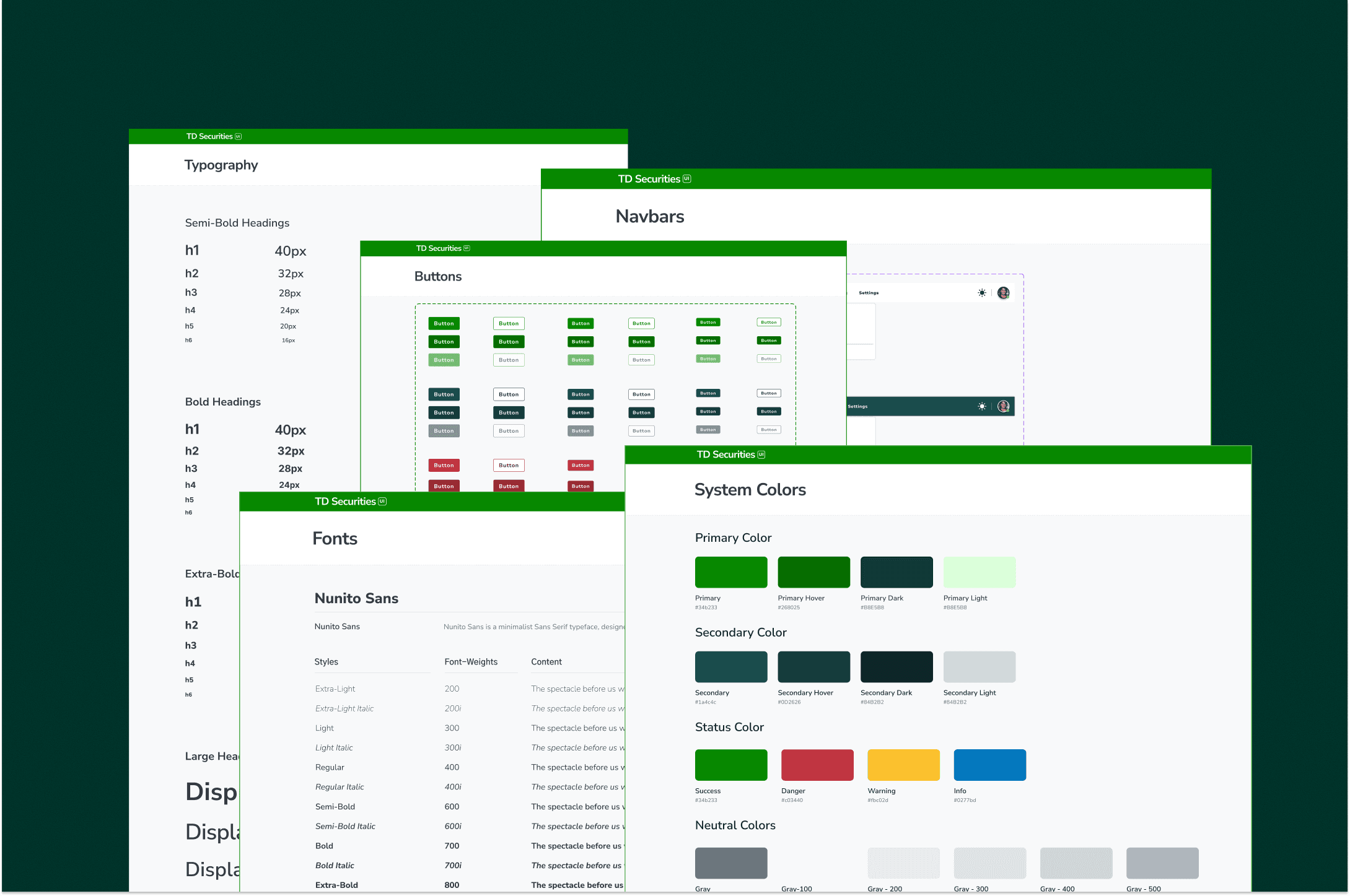
This case study is from my 2023 internship at TD Securities. Since then, Figma has introduced significant updates to design system tokens and much more at schema. The approaches documented here reflect the tools and patterns available at that time.
Role
Product Design Intern
Team
VP of Design & Eng,
Product Engineer,
Business Systems Analyst
Timeline
4 months
(Summer 2023)
Tools
Figma
Figma Variables
Excel (UAT)
Overview
Building and scaling a design system from the ground up
When I joined TD Securities as the only design intern, I inherited a fragmented design ecosystem -assets out of sync with code, dozens of undocumented variants, and no single source of truth. My job was to build Version 3 of the design system: simple, scalable, and understandable by both designers and developers.
What started as a component cleanup evolved into a full-scale system that was later adopted by multiple teams across TD Securities infrastructure and technology -including teams in New York and across Canada.
100+ Components Audited
Consolidated from fragmented Figma files across multiple teams
8+ Teams Onboarded
Adoption across TD Securities infrastructure & technology
Version 3 - Built on Figma Variables
First version to leverage Figma's 2023 variables launch, replacing variant-only architecture
Context
First design intern on a fast-paced innovation team
As the first design intern joining TD Securities, I had huge responsibilities placed on my shoulders. I was essentially my own senior. I got to call the shots on design decisions, but that also meant inheriting every problem that came with the existing system.
Seeing the lack of parity between designs and the actual code, it was clear that a concrete design system was overdue. There was no single source of truth, scrappy foundations around color, typography, and interactions, and little documentation for onboarding new contributors.
Designers couldn't find the right components to use, and engineers didn't know which implementations matched the intended designs.
My projects at TD are currently locked. If you'd like to know more about my internship experience or the projects I worked on, feel free to schedule a call!
The Problem
Too many variants, no single source of truth
Many of the pains I encountered designing for TD Securities' platform came from the inconsistency between my designs and the live application. Could it be that the developers were working with different assets? To validate my suspicions, I did a quick site audit.
I discovered that not only were the assets widely different -there were so many variants of buttons, badges, and other components scattered across files with no centralized documentation or review process.
Core Challenges
Variant Sprawl
100+ mismatched components and edge-case variants with no centralized documentation or review process.
Design-Code Mismatch
Figma assets out of sync with deployed code, creating constant friction during handoffs.
Siloed Teams
Product, engineering, and design worked without standardized terminology or shared protocols.
Onboarding Gaps
No starter kits or best practices documentation, making it nearly impossible for new team members to contribute consistently.
How can I create a design system that is simple, scalable, and understandable by designers and developers?
Discovery
Understanding what already existed - and why it failed
Full-Scale Component Audit
My first step was cataloguing every component and variant across Figma files. I mapped each to its coded counterpart (or lack thereof) to build a complete picture of the system's fragmentation. The audit revealed the full extent of the problem: duplicated components, inconsistent naming, and variants that existed for edge cases no one could explain.
Component Audit Spreadsheet
The Legacy: V1 and V2
This wasn't the first attempt at a design system at TD Securities. Before I arrived, there had been two previous versions. V1 and V2 were built by a senior design lead, but progress stalled when he left the team. His work had many layers to it -complex nested structures that were difficult for others to pick up and maintain.
Both V1 and V2 relied entirely on Figma variants. At the time, that was the only option. But the files had become unwieldy -hundreds of variant combinations that were hard to navigate and even harder to keep in sync with code.
Initial Foundation
First attempt at component standardization. Built with Figma variants only. Established basic color and typography tokens but lacked governance.
Archived - Senior lead departed
Expanded Coverage
Added more component coverage and nested structures. Still variant-only architecture. Files became complex with many layers, making handoff difficult.
Stalled - Too complex to maintain without original author
Variables-First Rebuild
Complete rebuild leveraging Figma's newly launched variables (2023). Simplified architecture, added governance, documentation, and cross-functional validation.
Active - Adopted across 8+ teams
I went back to the drawing board. V3 wouldn't just be another layer on top -it would be a clean rebuild with the new tools Figma had just given us.
Define & Ideation
How can I make this helpful for designers and developers?
Learning from the Best
I didn't start with the ability to create design systems. When I began, I had no idea how to organize all the components. Luckily, great companies like Shopify, Apple, and Google have public design systems I could learn from. However, these systems were massive and served more as inspiration than a direct guide.
What really helped me level up was incorporating Atomic Design principles -breaking everything down into atoms, molecules, organisms, templates, and pages. This gave me a mental model for how to structure the entire system.
Research & Reference Systems
The Variables Advantage
V3 coincided with Figma's 2023 launch of variables. This was a game-changer. The V1 and V2 files had relied entirely on variants to handle theming, states, and responsive behavior. Variables gave us a proper token layer -color tokens, spacing scales, typography tokens -that could be swapped and themed without touching individual components.
Looking back at the original problem -how to create a system that is simple, scalable, and understandable by both designers and developers -I realized that the needs of the developers were going to be just as important. I got a front-end developer to collaborate with me on the design system. Together, we included tokens, CSS classes, and code snippets directly in the Figma file. This was a quick way for both of us to learn how the other thinks and communicates.
For Designers
Variables replaced variant overload. A single button component with variable-driven states instead of 30+ variant combinations. Clear naming conventions tied to design tokens.
For Developers
Design tokens mapped directly to CSS variables. Code snippets embedded in Figma annotations. A shared language that eliminated guesswork during handoff.
Prototype
Keeping it simple yet scalable
Although I was the only designer, I knew the system would eventually house more designers. It needed to expand and be used by multiple people without breaking. What helped me keep elements scalable was sticking to atomic design principles, using nested components, and leveraging component properties to simplify variants.
Streamlining the Component Library
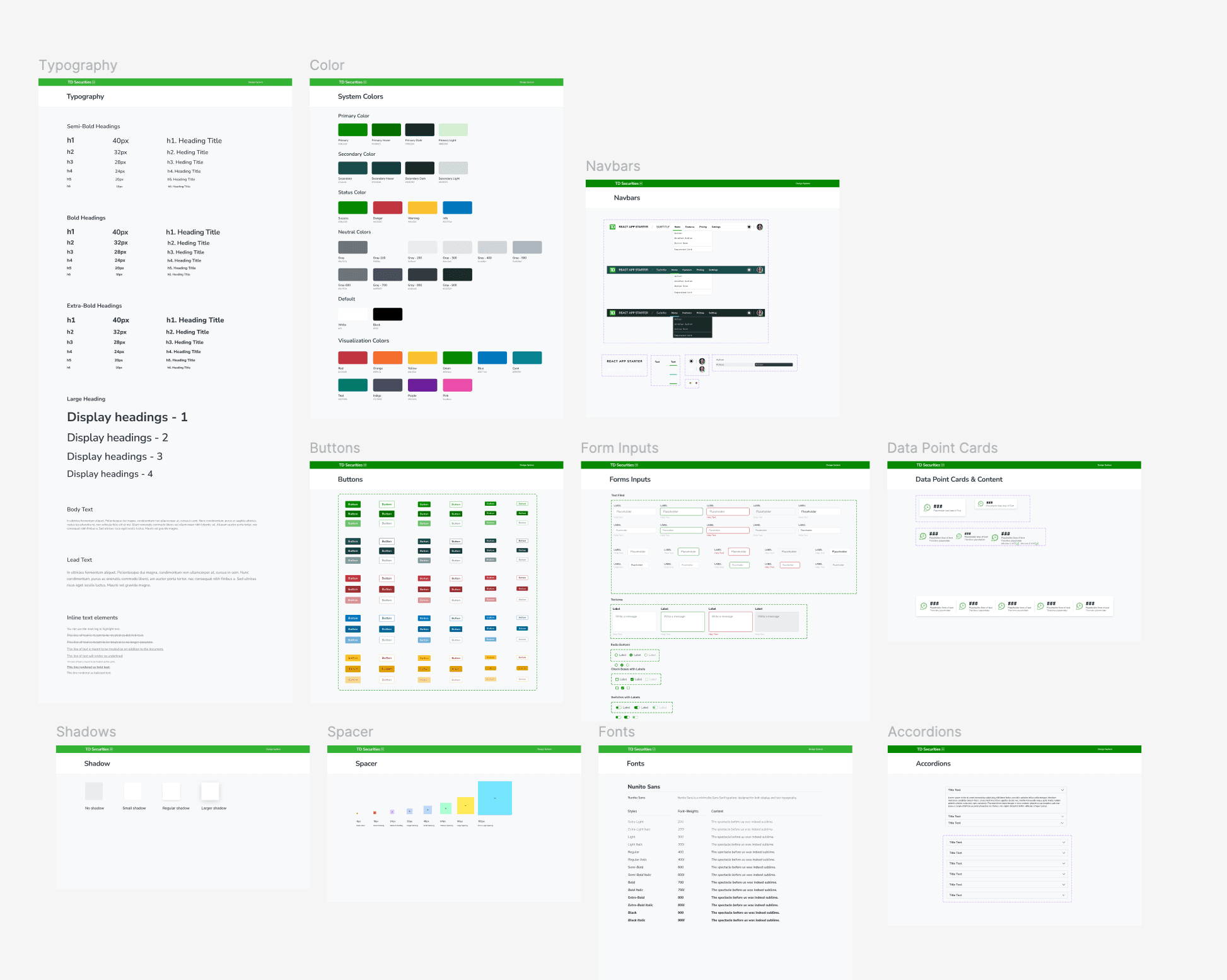
I audited and streamlined over 100 components using atomic design principles, organizing everything from foundational elements like color, typography, and spacing to complex UI patterns including alerts, modals, badges, breadcrumbs, navigation, and steppers.
Component Library Overview
It's still an ongoing learning experience to identify which components will be needed for reuse and which elements are specific for edge cases. The key was building with flexibility in mind while maintaining strict governance on what gets added to the core library.
Documentation That Developers Can Use
For each component, I created comprehensive documentation with design tokens, code snippets, and usage patterns. The documentation lived directly alongside the components in Figma, making it impossible to use a component without seeing how it should be implemented.
Component Documentation
One library, one language. Every token, variant, and usage pattern documented in a single source of truth.
Testing
But did it actually work?
The design system was constantly being iterated on. With new components being implemented, I needed to verify: had it actually improved the overall product? My dev team gave me insights into what was working and what wasn't.
UAT Testing Framework
Partnering with engineering, I built an Excel-based UAT audit that tracked every component against documented success and failure criteria. This wasn't a typical QA pass -it was a systematic validation of design-code parity, ensuring that what designers specified in Figma matched exactly what engineers shipped.
UAT Testing Matrix
Executive Workshops & Starter Kits
To secure executive buy-in and gather continuous feedback, I hosted showcase workshops for VPs of Engineering and Design. These weren't just presentations -they were hands-on sessions where leadership could see the system in action, ask questions, and understand the value it brought to their teams.
Workshop Session
I also created a Design System Starter Kit with guided onboarding materials and best practices, then distributed it across 8+ product teams to accelerate adoption.
The Outcome
From one intern's initiative to cross-border adoption
Scaling Beyond the Original Team
What started as a V3 rebuild during my internship didn't stop when I left. The system was adopted by multiple teams across TD Securities infrastructure and technology. Teams in New York and across Canada began using it as their foundation for building internal tools and applications.
The governance processes, documentation standards, and starter kits I established gave the system legs to grow without me. New designers could onboard in days instead of weeks, and developers had a reliable reference for every component they needed to build.
System Adoption
These efforts reduced developer QA cycles, eliminated design-code mismatches, and established the single source of truth teams needed to build confidently.
Looking Towards the Future
As the design system grows, the hope is to create more standardized assets that can be reused across frameworks. Breaking down components and documenting how they behave within the context of the developers' frameworks (like Bootstrap) would be the next evolution.
As the design team grows bigger, collecting feedback from a designer's perspective on how the system improves their workflow and onboarding will be critical. And on the flip side, understanding how the system can better serve developers -what's the best way to document components, display guides, and provide usage instructions.
Framework-Specific Documentation
Document component behavior within the context of frameworks developers actually use (Bootstrap, React, etc.).
Designer Feedback Loop
Collect feedback on how the system improves workflow, onboarding speed, and design consistency for new team members.
Productivity Measurement
Implement surveys on how teams interact with the design system daily, and whether it has measurably increased work speed and productivity.
Key Takeaways
What I took away
Governance and documentation are what make systems scale
Building components is the easy part. Creating the governance processes, naming conventions, and documentation that let others contribute without breaking things -that's what separates a component library from a design system.
Cross-functional collaboration unlocks real impact
By working closely with engineering from day one -embedding code snippets in Figma, building UAT frameworks together, and speaking in shared tokens -the system became something both sides actually wanted to use.
Workshops and starter kits drive adoption faster than documentation alone
Hosting executive workshops, building easy-to-use starter kits, and giving teams hands-on time with the system accelerated buy-in far more than any documentation page could. People adopt what they understand, and understanding comes from doing.